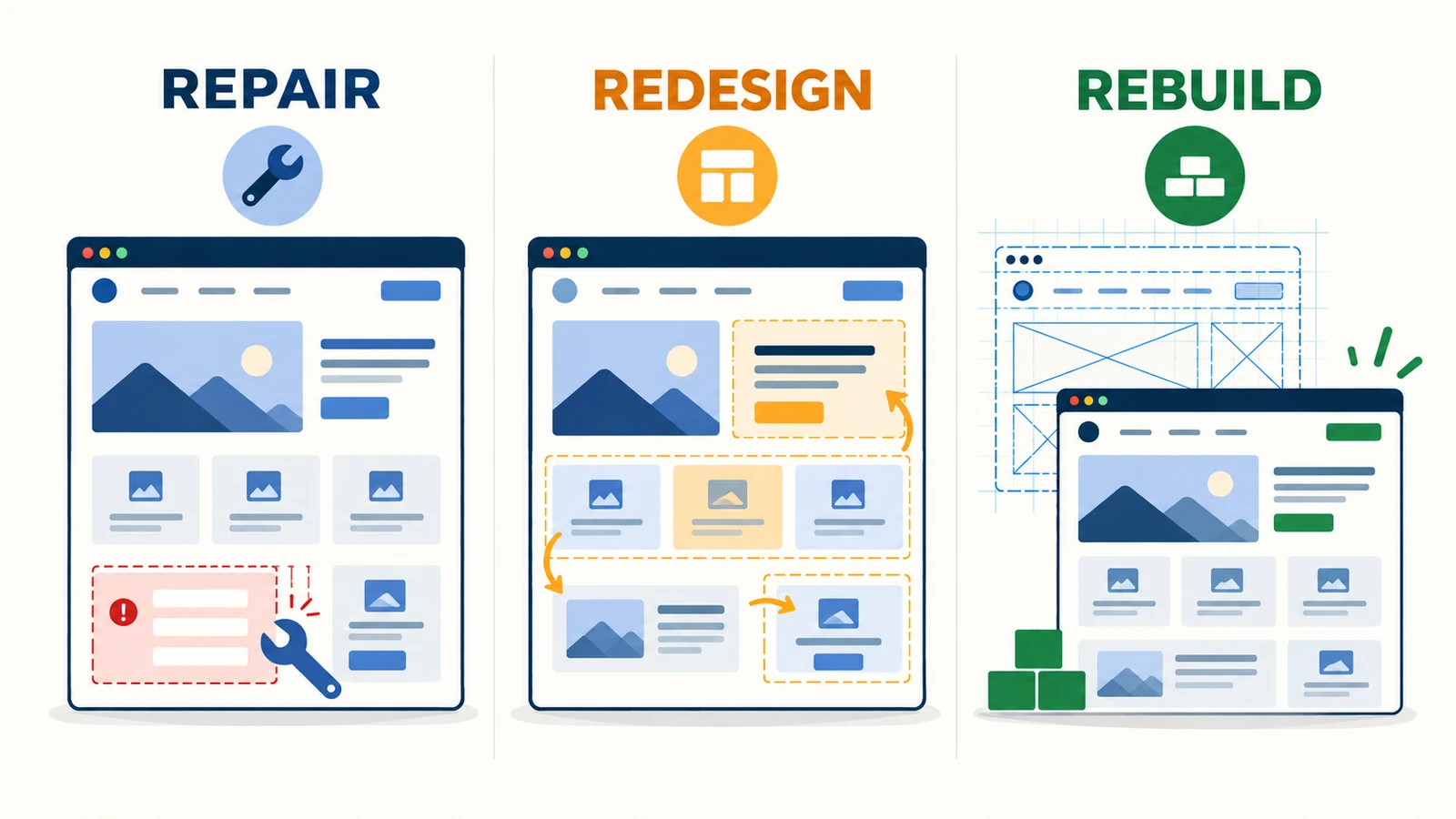
Repair the website if it has one clear problem. Choose a partial redesign if the platform and main structure still work, but the navigation, page content, mobile experience, or contact journey needs wider improvement. Consider a full rebuild only when the technical base, site structure, or functions are stopping the business from moving forward.
Do not rebuild everything only because the website looks old. Start with this table and check the real problem.
| What you see | Evidence to check first | Likely scope |
|---|---|---|
| One form, button, link, or page is broken | Reproduce the problem and check which pages are affected | Repair |
| The site works, but mobile reading, navigation, or service pages are unclear | User tests, popular entry pages, and completed enquiries | Partial redesign |
| The brand has changed, but the content and functions still fit | List the visual elements and pages that need an update | Partial redesign |
| The platform cannot be maintained safely or support an important function | Update history, access, technical limits, and maintenance cost | Full rebuild |
| The services and customers have changed, and the old structure is no longer clear | Content list, search queries, user journeys, and business goals | Possible full rebuild |
| The website gets no enquiries | Indexing, impressions, clicks, page content, and contact flow | Diagnose first |
I am Vern Chun from Milaos. I help small and medium businesses in Malaysia with websites, SEO, and Local SEO. My approach is to find the smallest useful change before recommending a larger project.
When is a repair enough?
A repair is usually enough when the problem is limited to a few functions or pages and the rest of the website still supports the business.
Common examples are:
- The WhatsApp button, phone link, form, or email notice does not work.
- Some links lead to a 404 page or the menu opens the wrong page.
- The SSL, domain, images, or fonts do not load correctly.
- One page breaks on mobile while the other pages work.
- A plugin, theme, or system update causes a problem.
- The address, opening hours, service details, or team information needs an update.
First reproduce the problem and find its cause. For example, a missing form notice may come from the form settings, email service, or inbox rules. Changing the button colour will not fix it.
If the same problem keeps returning because the theme, plugin, or platform is no longer maintainable, a repair may only be a short-term step. It is then useful to compare the repeated repair cost with a better technical base.
When does a partial redesign make sense?
A partial redesign makes sense when the platform, URL structure, and main content can stay, but a group of pages or one user journey needs improvement.
For example:
- The mobile page opens, but the text, buttons, or tables are hard to use.
- The navigation is confusing, so visitors cannot find services, case studies, or contact details.
- The homepage still presents the old business and does not lead to the main services.
- Service pages use general claims but do not explain the scope, customer, area, process, or proof.
- Visitors cannot tell whether to use WhatsApp, book a call, or request a quote.
- The brand style has changed and the colours, type, images, and page elements need to match.
A partial redesign is more than changing colours. Choose one journey, such as arriving from Google on a service page and asking for a quote through WhatsApp. Then check every page, message, and function in that journey.
The scope may cover the homepage and three main service pages, or only the mobile navigation, contact flow, and shared page elements. There is no need to move the whole site when the current platform is still reliable.
When should you rebuild the whole website?
A full rebuild is useful when the technical base, content structure, or function limits the business and smaller changes cannot solve the problem properly.
Strong signs include:
- The system or important components no longer receive updates and cannot be maintained safely.
- Nobody has full access to the domain, hosting, source files, or admin area, and the current provider cannot complete a handover.
- Every update breaks another page and maintenance work keeps increasing.
- The business now has several brands, locations, services, or customer groups, but the old navigation and URL structure cannot present them clearly.
- The business needs bookings, memberships, payments, multiple languages, a content editor, or a system connection that the current platform cannot support properly.
- The page templates and content structure prevent you from adding useful service, case study, or location pages.
A rebuild does not always mean changing the platform. A WordPress website can keep WordPress while using a new theme and structure. A static website can keep its technology while changing the content and components. Choose the platform based on who updates the content, the functions needed, who maintains it, and how it will be handed over. See the WordPress and Astro guide for business websites for this decision.
An old visual style can be a reason to redesign, but it does not prove that a full rebuild is needed. Check whether the design is affecting understanding, trust, or the ability to complete a task.
Use six types of evidence to decide
Collect these six items before asking for quotes. They help you avoid a rebuild based only on opinion and help suppliers quote for the same scope.
1. Business goal
Write down the website’s most important job for the next year. It may be getting enquiries for one service, accepting bookings, showing project work, or letting the team publish content. Each goal should lead to an action a visitor can complete.
2. Website performance
Use the Search Console Performance report to see which pages and queries already receive impressions and clicks. Use GA4 to see which pages people enter through and whether they complete a contact action.
Do not remove a page with useful search visibility only because its design is changing. Decide whether to keep, update, combine, or redirect it.
3. Real user test
Ask someone who does not know the website to complete one task on a phone. For example, ask them to find a service, confirm the service area, and send a WhatsApp message. Record where they stop without teaching them how to use the site.
4. Content list
List every page, PDF, image, article, case study, and language version. Mark each one as keep, update, combine, or remove. This shows repeated content, missing owners, and migration work early.
5. Functions and technical limits
List the functions that must stay and the functions the business has already decided to add. Then check whether the current platform can support them reliably. Do not rebuild for a feature that may never be used, but do not ignore a confirmed booking, payment, or editor requirement.
6. Ownership and access
Confirm who owns the domain, DNS, hosting, source code, CMS, Search Console, GA4, and third-party accounts. Missing access can stop the launch or break tracking.
If the only known problem is that the site gets no enquiries, start with the six-step website enquiry check. It helps separate a visibility problem from a page or contact problem.
How can you keep SEO during a redesign?
Most avoidable SEO risk comes from changes to URLs, content, internal links, and crawl settings. Save the current state before the work, map every change during development, and check the result after launch.
Before the redesign
- Export all accessible URLs and record their status, title, description, canonical, and internal links.
- Save a Search Console baseline for important pages, queries, clicks, and impressions.
- Mark pages with useful search visibility, links, enquiries, or business value.
- Decide whether each old URL will stay, be updated, be combined, or be removed.
- Confirm that GA4, Search Console, and the main contact events work.
During development and migration
- Keep existing URLs where possible.
- If a URL must change, map the old URL to the most relevant new URL.
- Use a permanent server-side 301 or 308 redirect and avoid redirect chains.
- Do not send many unrelated old pages to the homepage.
- Keep useful text, titles, internal links, image descriptions, and structured data before improving them.
- A test site can use access control or
noindex, but remove any block that should not remain at launch. - Update canonical links, hreflang, the sitemap, and internal links so they use the live URLs.
Google’s site move guide recommends mapping old URLs to new URLs and monitoring the move. Google’s redirect guide also recommends permanent server-side redirects for a permanent move.
After launch
- Test the main pages, forms, WhatsApp, phone, payment, or booking journey.
- Crawl the site and check 404 errors, wrong redirects, canonical links,
noindex, and robots rules. - Submit the new sitemap and check indexing in Search Console.
- Compare time periods of the same length and review changes by page and query.
- Record the launch date, later fixes, and business campaigns, so you do not attribute every change to the redesign.
Some movement can still happen after launch. Nobody can guarantee that every keyword will stay in the same position, but missing URL maps, deleted content, and a forgotten noindex are preventable errors.
What affects the time and cost?
The project name does not set the price. The number of pages, content, design, functions, migration, and approval process decide the work.
When comparing quotes, check:
- How many pages and templates will be repaired or rebuilt.
- Who prepares the copy, images, translation, and business information.
- Whether mobile, tablet, and desktop design is included.
- Whether the site needs a CMS, multiple languages, forms, bookings, payments, or third-party connections.
- Whether old articles, products, case studies, or customer data must be moved.
- Whether URL mapping, redirects, and pre-launch SEO checks are included.
- How many revision rounds are included and who gives final approval.
- How the domain, hosting, source code, and accounts will be handed over.
- How much support is included after launch and how ongoing maintenance is charged.
A repair usually has the smallest scope. However, repeated repairs on a system that is hard to maintain can keep increasing the total cost. A full rebuild has the largest scope, but it should not include pages and functions without a clear use.
A practical decision checklist
- I can state the website’s main business goal.
- I know whether the problem affects one place or a complete user journey.
- I have checked Search Console and GA4 for important pages.
- A real user has completed the main task on a phone.
- I have marked each item as keep, update, combine, or remove.
- I have listed the functions that must stay and the new functions the business needs.
- I have access to the domain, hosting, admin area, source files, and analytics accounts.
- I know which URLs have search visibility or external links.
- The quote lists content, migration, SEO, revisions, and handover.
- Someone is responsible for testing, monitoring, and fixing issues after launch.
If you are still unsure, send me your current URL, the main problem, and the content and functions that must stay. I will first identify whether it is closer to a repair, partial redesign, or full rebuild, then explain the suitable website design scope. If the problem is mainly search visibility, you can start with a free initial SEO check to avoid treating an SEO problem as a full design problem.
FAQ
How often should a website be redesigned?
There is no fixed number of years for every website. If the website still supports the business, works well on mobile, has accurate content, and can be maintained, its age alone is not a reason to rebuild it. Review it when users face repeated problems, the technology limits your work, or the business has changed.
How do I choose between a repair, partial redesign, and full rebuild?
Repair the website when only a few links, forms, images, or layouts are broken. Choose a partial redesign when the platform and main structure still work, but the navigation, service pages, mobile experience, or enquiry path needs broader improvement. Consider a full rebuild when the technical base cannot be maintained, the structure no longer fits the business, or important functions cannot be added properly.
Can a website redesign affect SEO?
Yes. Changing URLs, removing useful content, changing internal links, leaving noindex in place, or missing redirects can affect crawling, indexing, and existing search performance. Keeping important URLs and using permanent redirects for URLs that must change can reduce the risk.
How can I redesign a website without losing SEO?
Before the redesign, save the current URLs, important pages, search queries, and traffic baseline. Keep useful URLs, content, titles, and internal links where possible. If a URL must change, map it to the most relevant new page and use a 301 or 308 redirect. After launch, submit the sitemap and check noindex, robots rules, 404 errors, and Search Console data.
How long does a website redesign take?
The timeline depends on the number of pages, content readiness, design approval, languages, functions, data migration, and how quickly decisions are made. Make a content and function list first, then estimate the repair, partial redesign, or rebuild based on the actual scope.
How much does it cost to update an old website?
The cost depends on the scope. Fixing one form is very different from rebuilding the content, design, functions, and URL structure. Ask each quote to list the pages, content, functions, languages, migration, SEO checks, revision rounds, account handover, and support after launch.