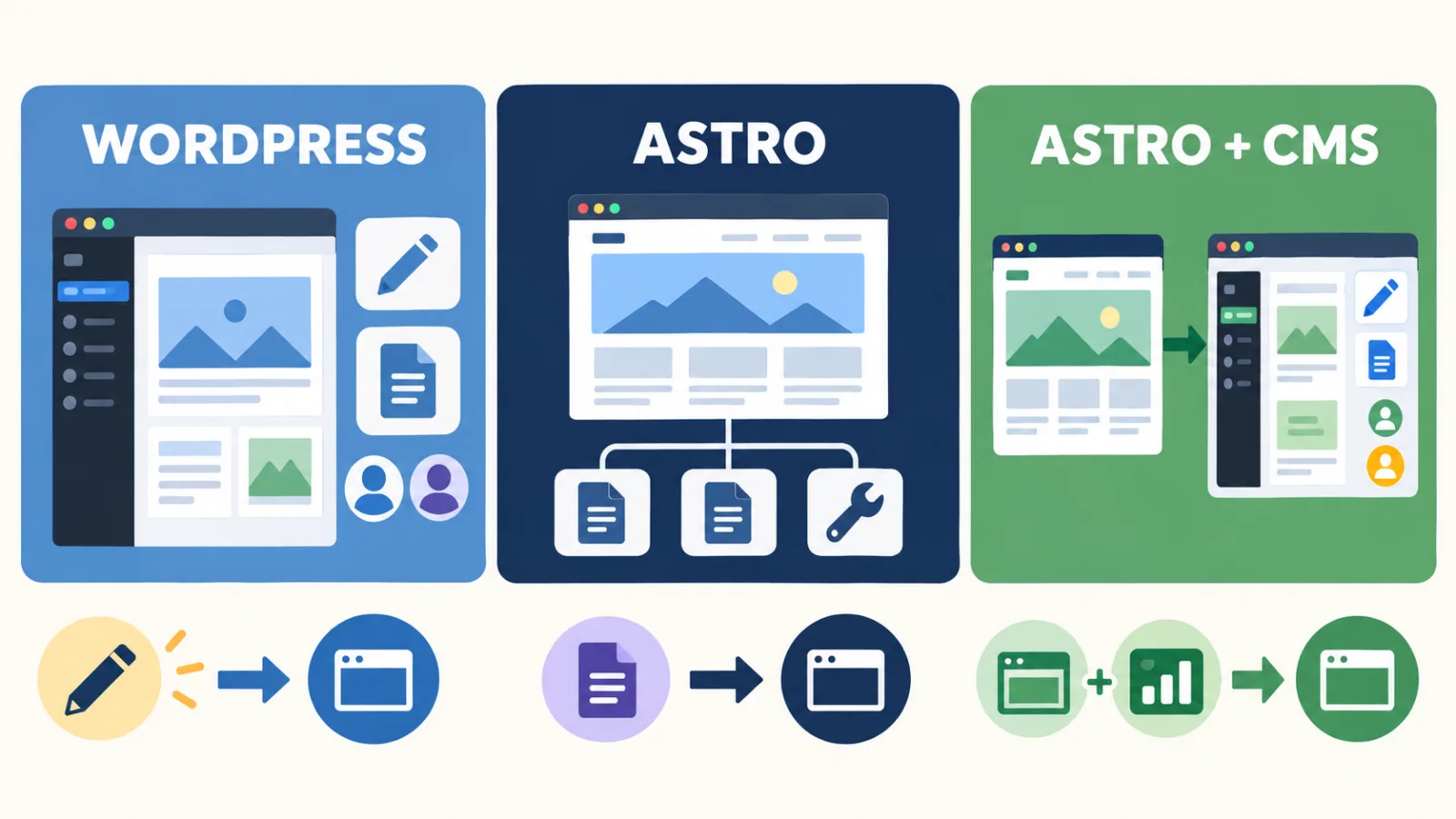
Choose WordPress when your staff need to log in often, update pages, publish articles, or work with different user roles. Choose a standard Astro website when the content is stable and a developer will manage the updates. Choose Astro with a CMS when your team needs a dashboard but you still want an Astro front end. The CMS setup is an extra part of the project.
Do not start by asking which platform is more advanced. Start with a practical question: who will update the website after launch, and what will they need to change?
| Your situation | Start by considering | Why |
|---|---|---|
| The owner or staff update pages, articles, and team details every week | WordPress | The dashboard, content, and user roles are in one system |
| The website has stable company and service information with only a few updates | Standard Astro | A developer can manage the content without adding a CMS that you do not need |
| Editors need a dashboard, but the website will use Astro | Astro with a CMS | The CMS manages content and access, while Astro handles the front end |
| You need a shop, booking, membership, or a complex business process | Define the full function first | The user flow and maintenance work matter more than the platform name |
I am Vern Chun from Milaos. I build WordPress and Astro websites for small businesses in Malaysia. This guide compares the choices from a business owner’s point of view. It focuses on editing, cost, SEO, maintenance, and handover instead of developer benchmarks.
What are WordPress, Astro, and a CMS?
WordPress combines a content dashboard with the website system. Astro is a framework for building the website front end. Its content can come from files or a separate CMS.
WordPress normally stores the website content in a database. The owner or staff can log in and edit pages, posts, images, and other content based on their access level. A theme controls much of the design. Plugins can add forms, SEO tools, ecommerce, and other functions.
A standard Astro website can keep content in Markdown, MDX, or other project files. A developer edits the files and deploys the website again. Astro can also connect to a headless CMS. Editors use the CMS dashboard, while Astro reads the content and displays it on the website.
The statement that Astro has no WordPress dashboard is only part of the answer. Astro does not include a complete CMS by default, but it can connect to one. Your quote should say whether a CMS is included, what you can edit, how you preview changes, who deploys them, and who provides support.
Decide who will update the website
The person updating the website and the update frequency are the best starting points for this decision.
WordPress is often the more direct choice if the owner, marketing staff, or admin staff need to do these tasks:
- Publish a new Blog article every week.
- Change services, prices, team details, or promotions often.
- Let several staff members manage different content.
- Save drafts, preview changes, and approve content before publishing.
- Make small text changes without contacting a developer.
WordPress has different user roles and permissions. An Administrator, Editor, and Author do not have the same access. The handover should explain who controls the main account, what staff can edit, and how the layout is protected from accidental changes.
A standard Astro website may be enough when the site only has company information, a few service pages, and contact details, with changes only a few times each year. The developer receives the new information, updates the files, checks the pages, and deploys the site. The business has one less dashboard to manage, but future changes follow the agreed developer process.
Astro with a CMS is another option when the team needs to edit its own content. This requires more than connecting one account. The developer must choose the CMS, create the content fields, set access and previews, connect it to Astro, handle deployment, and explain how images and languages are managed.
Is it difficult or free to connect Astro to a CMS?
It can be simple for a small website. The work becomes more complex when you add more content types, editors, permissions, previews, and approval steps. Some CMS products have free plans or open-source versions, but the complete setup is not automatically free.
A Blog with only a title, article body, and cover image is much simpler than a system with these needs:
- Separate content and review for several languages.
- Structured content for services, team members, projects, locations, and FAQs.
- Different access for several editors.
- A preview that looks close to the live website.
- Central image management or automatic image processing.
- Automatic builds and deployment after content changes.
- Version history, restoration, or approval steps.
There may also be costs for the CMS plan, hosting, number of users, API use, image service, preview environment, and developer support. Do not ask only whether the CMS is free. Ask what you will pay in the first year and later years, and what happens if a subscription stops.
Which one is better for business functions?
WordPress has many ready-made plugins for common functions. Astro can use external services or custom development. The better choice depends on the complete user flow and the person maintaining it.
| Need | Common WordPress approach | Common Astro approach | What to confirm |
|---|---|---|---|
| Contact form | Form plugin or a custom form | External form service, API, or server function | Notifications, spam, data storage, and failed submissions |
| Blog | Edit in the WordPress dashboard | Content files or a CMS | Who publishes, and whether previews and user roles are needed |
| Multiple languages | Multilingual plugin or separate content | Language routes with files or CMS content | Who translates, how content stays in sync, and how hreflang is set |
| Online shop | WooCommerce and related extensions | External commerce platform or a custom integration | Products, stock, payment, delivery, refunds, and maintenance |
| Booking | Booking plugin or external service | External booking service or a custom integration | Time slots, notifications, payment, cancellation, and data protection |
| Member or client area | Plugins or custom development | Authentication, database, and application features | Access, security, data, support, and ongoing development |
More WordPress plugins do not mean a better website. Each plugin should solve a real need, and the quote should explain its licence, updates, and conflict handling. Astro can connect to many services, but a custom integration is not always cheaper. Map the full customer journey before comparing the technical approach.
Is WordPress or Astro better for SEO?
Both can support good SEO. The platform name does not create rankings by itself.
Google recommends crawlable links, clear and separate URLs, a sitemap, and a website that works well on mobile devices and loads securely. Google’s guidance for AI search features still depends on accessible content and the normal SEO foundations.
Check what the website project will deliver:
- A separate and stable URL for every important page.
- Individual titles, meta descriptions, canonical tags, and social sharing details.
- Clear headings, body content, image alt text, and internal links.
- Correct sitemap, robots.txt, and redirects where needed.
- Structured data that matches the visible content.
- A mobile layout that is easy to read and use.
- Search Console and GA4 accounts owned by the client.
- A clear plan for content and technical improvements after launch.
Astro often produces pages in advance or on the server. WordPress can also perform well with a suitable theme, caching, images, and hosting. A poorly built Astro website can still have weak content, links, metadata, or JavaScript issues. Ask the provider to show the actual pages and SEO checks instead of accepting the claim that one platform is always better for SEO.
Which one has the lower total cost?
Compare the same scope and include the costs that may happen over the next three years. Do not compare only the first website fee.
Separate the costs into five groups:
- Planning, design, development, content preparation, testing, and launch.
- Domain, hosting, CMS, plugins, themes, APIs, and external services.
- Content updates, software updates, backups, monitoring, and repairs.
- New pages, new languages, new functions, and business integrations.
- Handover and migration when you change the developer, host, or platform.
A standard Astro website may avoid the work and cost of setting up a CMS when the content is stable. However, small changes may have a developer cost if you do not manage the files yourself.
WordPress makes it easier for a business owner to edit content, but it may still have hosting, paid plugin, update, backup, and repair costs. Astro with a CMS adds the CMS plan, integration, and editorial workflow, so it is not always cheaper than WordPress.
Both websites still need maintenance
WordPress and Astro both need attention after launch. They simply have different maintenance tasks.
WordPress usually needs core, theme, plugin, database, backup, user access, and hosting management. Important pages and forms should be checked after updates. A working backup is needed if an update causes a conflict.
Astro usually needs dependency, build, deployment, hosting, form, API, CMS, and external service maintenance. Keeping the content in files can reduce the dashboard and database work, but it does not remove every security or maintenance task.
The quote should explain who checks the website, what is backed up, how faults are handled, how content changes are charged, and how the website will be handed over when the working relationship ends.
What should you receive during handover?
Whichever platform you choose, your business should keep control of the domain, business accounts, and important website assets.
For a WordPress website, confirm that you will receive:
- Domain, hosting, and WordPress Administrator access.
- Website files, database, and a usable backup.
- Information about themes, plugins, and licence ownership.
- Access to GA4, Search Console, email, payment, and other external accounts.
- Dashboard instructions and maintenance records.
For an Astro website, confirm that you will receive:
- The source code repository and complete project files.
- Domain, hosting, and deployment accounts.
- Build settings, environment variables, and a list of external services.
- CMS Administrator access, content export options, and media assets.
- Instructions for updates, deployment, backups, and changing developers.
You can move between WordPress and Astro later, but the work may include new templates, content conversion, functions, images, and URLs. Keep important URLs where possible, create the required redirects, and check Search Console before and after launch. These steps help protect the search signals that the website has already earned.
Three business examples
Example 1: A five-page local service website
The website has Home, About, Services, one service page, and Contact. The content changes only a few times each year. WordPress and Astro can both do the job. WordPress is more direct when the owner wants to log in and edit. Standard Astro may be enough when a developer handles the few changes.
Example 2: A team publishes articles and projects every week
Several staff members need to write, save drafts, preview, and publish. WordPress is often the simpler starting point. Astro can also work, but the CMS, user roles, previews, and deployment process should be included in the scope. Do not buy a standard Astro website and discover later that the editing method does not match the team’s work.
Example 3: A shop, booking system, or member area
List the products, stock, payments, delivery, cancellation, user access, notifications, data, and support flow first. A standard online shop can start by considering WordPress with WooCommerce. Astro can also connect to commerce or back-end services, but it should be quoted as a complete system. The normal price for a business website cannot define this scope.
How does Milaos offer WordPress and Astro websites?
The table below uses the named scope of the current Milaos Business Website package. It is not an average price for the Malaysian market. The final written quote confirms the project scope.
| Option | Content method in the RM2,500 base scope | Suitable when |
|---|---|---|
| WordPress | Agreed content editing method and basic guidance | The owner or staff need to manage common content |
| Standard Astro | Developer-managed content | Content is stable, updates are limited, and a separate CMS is not needed |
| Astro with a CMS | Assessed and quoted separately | The business needs an Astro front end and also needs visual editing, permissions, or a workflow |
The base package covers up to 5 main pages, 1 language, an agreed WhatsApp path or simple form, basic SEO, Search Console and GA4 setup, two organised revision rounds, and 30 days of support after launch. The client owns and pays for the domain, hosting, and external accounts. Extra languages, complex forms, booking, ecommerce, membership, paid services, ongoing content, ongoing SEO, and long-term maintenance need a separate scope.
If you still need to check the pages, dashboard, plugins, fees, and handover, read the WordPress website quote checklist.
Answer these 10 questions before asking for a quote
- Who will update the website, and can that person work with code?
- How many times will the team change or publish content each month?
- Will you edit pages, articles, projects, products, or other content?
- How many editors need access, and what approval steps are required?
- Do editors need to preview content before publishing?
- Do you need forms, booking, ecommerce, membership, CRM, or other integrations?
- How many languages are needed, and who manages the translations?
- Which plugins, CMS products, or external services have yearly fees?
- Who handles updates, backups, faults, and content changes?
- Which accounts, source files, documentation, and instructions will you receive?
Send me these answers and I can help you check whether WordPress, standard Astro, or Astro with a CMS fits your way of working. View the website design service and current pricing, or use the contact page to share your pages, languages, functions, editors, and expected launch date.
FAQ
Is Astro better than WordPress for SEO?
Not always. The platform name does not improve rankings by itself. Both can provide crawlable pages, separate URLs, titles, descriptions, canonical tags, sitemaps, structured data, and internal links. Results also depend on the content, search intent, website experience, external signals, and ongoing improvements.
Can a business owner update an Astro website?
Yes, but the editing method should be decided before the website is built. A developer can update content files, or Astro can connect to a headless CMS so the business owner can use a dashboard. A CMS also needs content fields, access rules, previews, deployment, and support, so it may require extra work.
Does Astro come with a CMS dashboard?
Astro is a web framework, not a complete CMS like WordPress. It can use Markdown or MDX files, connect to a separate CMS, or use an existing WordPress website as a headless CMS.
Is WordPress or Astro cheaper?
Compare the same scope. Pages, languages, design, copy, functions, CMS, paid plugins or services, hosting, maintenance, and content changes all affect the total cost. A standard Astro website may need less dashboard work, but Astro with a CMS is not always simpler or cheaper than WordPress.
Is WordPress or Astro easier to maintain?
They have different maintenance work. WordPress usually needs core, theme, plugin, database, and backup management. Astro still needs dependency, build, deployment, hosting, and integration maintenance. The easier option is the one with clear responsibilities, account ownership, update steps, and support.
Can I move from Astro to WordPress, or WordPress to Astro later?
Yes, but it is usually not a one-click change. The work may include rebuilding templates, moving content, handling images and URLs, setting redirects, rebuilding functions, and checking SEO. Keep the domain, important URLs, metadata, content, structured data, and a redirect plan to protect existing search signals.